PDF manipulation for the command line
Split, merge, and manage PDFs with precision. A fast, type-safe CLI built with Bun. Includes an interactive TUI for visual page selection.
Split
Extract pages with surgical precision. Single pages, ranges, or complex selections.
Merge
Combine documents seamlessly while preserving quality and metadata.
TUI
InteractiveInteractive visual interface for browsing and selecting pages.
Extract What You Need
Precise page extraction with flexible range syntax. Single pages, ranges, or complex selections — all in one command.
Combine with Confidence
Merge multiple PDFs into a single document. Works with any number of files, preserving quality and metadata.
- ✓Preserves hyperlinks and bookmarks
- ✓Maintains document metadata
- ✓Smart output naming by default
- ✓Glob pattern support for batch operations
When You Want More Control
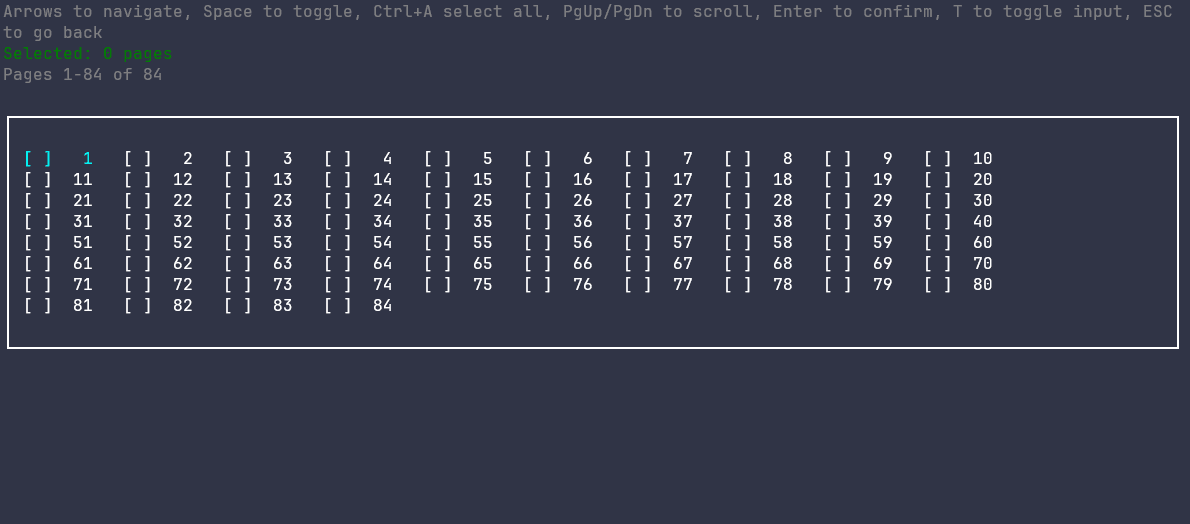
Launch the interactive TUI for visual file browsing and page selection. Perfect for complex selections or when you need to preview before extracting.
Keyboard Navigation
Arrow keys to navigate, Space to toggle selection
Visual Selection
See your selection in real-time before extraction
Range Input Mode
Press 'r' to enter ranges like '1-5,8,10'
Bun-Powered
Lightning-fast runtime for instant operations
TypeScript
Type-safe CLI with full IntelliSense support
Dual Interface
Command-line and interactive TUI modes
Smart Defaults
Auto-naming and sensible output conventions
Get Started
Install globally and start manipulating PDFs in seconds.